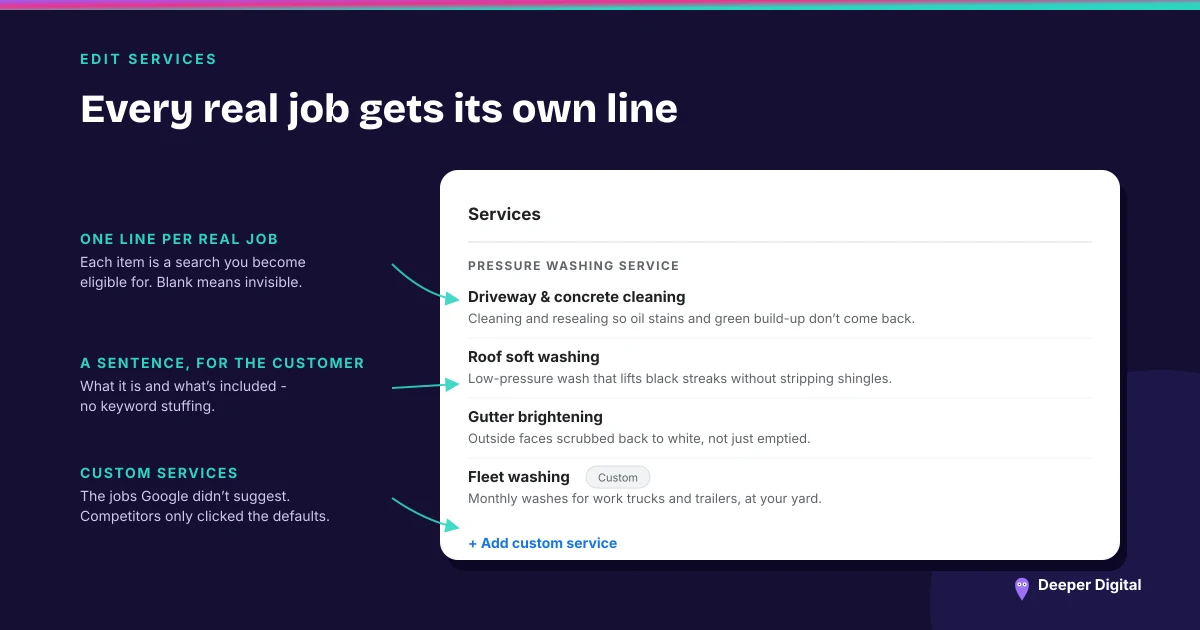
Services is for work you perform. Products is for physical goods a local store sells. Which of the two editors appears on your profile is decided by your primary business category, not by which one you would rather have — Google lists both menus and products as limited availability, and describes services as showing up for businesses in certain categories.
Most service businesses have one of these sitting empty and the other one absent, and have never checked which is which.
Check which editor you actually have
Open the profile editor and look before planning anything. Changing your primary category to make a different surface appear is a bad trade: the category is doing far more work for you than the editor is. (Primary versus secondary categories, and what changing one costs.)
If Services is there and blank, that is the job. If Products is there and you do not sell goods over a counter, read on before filling it in.
Fill Services in the customer’s words
Google offers a menu of suggested entries tailored to your business type, plus the option to write custom ones, and lets you group entries into categories with descriptions and prices attached.
The suggestions are worth taking where they fit, because they are the phrasings Google already recognizes. The custom entries are where you name the thing customers actually ask for, which is frequently not what the trade calls it. Write both.
Each entry supports a description. Use it. A service list of eleven two-word items tells a reader nothing they could not have guessed from your category. (Why the words on a profile matter more than the count of them.)
Keep the price out of the name
Google’s guidance is direct on this one: avoid profanity, gibberish, personal information, prices or phone numbers in custom service names, and custom services that violate policy are automatically rejected.
There is a price field on the entry. That is where the number goes. A service named “Ceramic coating, starting at four hundred” is the shape that gets thrown out, and it gets thrown out quietly, which is why owners discover months later that half their list never published.
Do not repurpose Products for service packages
You will see this advice around, and Google’s own pages do not support it.
The product editor is described as a fit for a business with a local store selling physical goods — one that may also have no website selling online, products without barcodes, or no fresh stock data. Products submitted through it have to follow the shopping ads policy. And when Google lists the other ways to feature what you offer, it sends businesses that sell services to the services editor, dining rooms to the menu editor, and ticketed experiences to their own place.
None of that is a ban on trying. It is a warning that you would be putting service copy into a surface built and policed for retail inventory, which brings us to the part with teeth.
One bad entry can take the rest with it
Google states that if you submit products that violate its policy, it can result in the removal of all of the products you uploaded.
Not the offending one. All of them. That is a materially different risk from a rejected service entry, and it is the single best reason for a service business to leave the products surface alone unless it genuinely sells things.
The exception that is real
Some businesses in these trades do sell goods across a counter — retail skincare at a clinic, coatings and towels at a detailing shop. If that describes you and the editor is there, it is a legitimate use, and it is separate from your service list rather than a substitute for it.
Everything else — packages, memberships, bundles — is service copy, and it belongs in Services with a description and a price field.
Open your profile, note which editor you have, and fill the right one properly — suggested entries first, custom ones after, prices in the price field. It is an afternoon. Doing it and then keeping it current as the menu changes is part of the profile work on every plan.
 NASP
NASP  Wild Foods Co.
  Noble Origins
  Cowboy Pools
  BT Biltong