Google gives every photo you upload one of three statuses: Pending, Not approved, or Live. That status is the entire feedback loop. There is no per-photo explanation, no queue you can query and, for one category of removal, no appeal at all. Working out which of the four common causes applies to yours is the whole job.
Start with the possibility that nothing was removed
Pending means the file is still uploading or processing — or that the profile is not verified. Google states plainly that photos and videos show on Google only after verification, and that pending media is invisible to customers in the meantime.
Google also says it can take 24 to 48 hours for uploaded media to appear. An hour of refreshing proves nothing. And if the image genuinely never lands, Google’s first suggestion is to check it isn’t a duplicate of one already on the profile, then upload it again.
The specs that disqualify a file quietly
Not approved covers policy, but plenty of uploads fail earlier, on numbers nobody reads before shooting. Google publishes them: JPG or PNG, between 10 KB and 5 MB, 720 by 720 pixels recommended, 250 by 250 as the floor. Video is capped at 30 seconds, 75 MB, and 720p or better.
A phone photo clears all of that without trying. A logo exported at 180 pixels wide from a design file, or a 9 MB export straight off a camera, does not.
The edits that read as unreal
Here Google’s language turns from specification to judgment. It asks for photos that are in focus and well lit, with no significant alterations or excessive use of filters, and it explains why in one sentence: the image should represent reality. It can tell, and it says so politely.
Its Maps media guidance goes further and names the shapes to avoid — screenshots, stock photos, GIFs, collages, heavily edited or manipulated images, and imagery created by somebody else. Also: borders, superimposed text, heavy filters, blurry or out-of-focus frames. The media should be captured by you, at the place, with the place as the subject.
Read that list against what most service businesses actually upload and the pattern is obvious. The branded graphic with the phone number across it, the before-and-after collage assembled in Canva, the stock photo of a van that is not your van — three of the most common uploads in these trades sit directly on that list. (Before-and-after photos are still worth shooting; they just have to be shot, not assembled.)
The removal with no appeal
One line in Google’s Maps media guidance deserves quoting on its own: low quality media may be removed, and quality removals can’t be appealed.
That is the ceiling on how much effort is worth spending arguing about a specific photo. If it went for quality, it is gone. Reshoot it — well lit, in focus, no overlay, at the location — and upload the new file rather than the same one again.
Two things that look like removal and are not
The logo that never appears is often not rejected. Google says the logo may be missing because the profile lacks the information it needs alongside it: name, a valid location with a street address, categories, phone number and opening hours. Fill those and the logo has somewhere to sit.
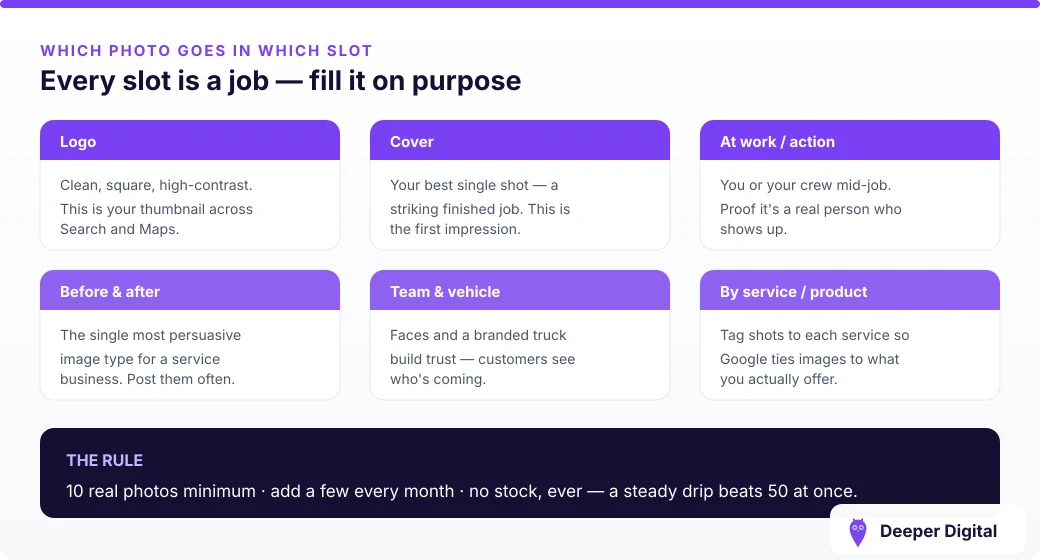
The cover photo is stranger. Google says setting one does not guarantee it appears first, and that if the chosen image is low quality — or if other signals suggest a better one — a user-submitted photo may be shown instead. Your cover photo is a request, not an instruction. (Which photo slot does what, and how many of each to keep current.)
Photos are a monthly habit, not a launch task: shoot the work, upload it, and watch the status rather than the wall. Keeping that cadence going — and the profile behind it accurate — is part of every plan.
 NASP
NASP  Wild Foods Co.
  Noble Origins
  Cowboy Pools
  BT Biltong